100 Members in 100 Days — Email Studio for $199 (30 spots)

$100 off your first 6 months·only 30 spots left, or until October 1 — whichever comes first.

The only email app that turns voice notes into high-converting emails.
No desk required.

Trained on your voice, your offers, your clients, and 30+ proven email styles. It interviews you, you answer with a voice note, and every email is infused with your ideas, stories, and point of view so nothing sounds generic.

$299 $199 YOUR FIRST 6 MONTHS · $100 OFF

Then renews at $299 every 6 months. Cancel anytime.

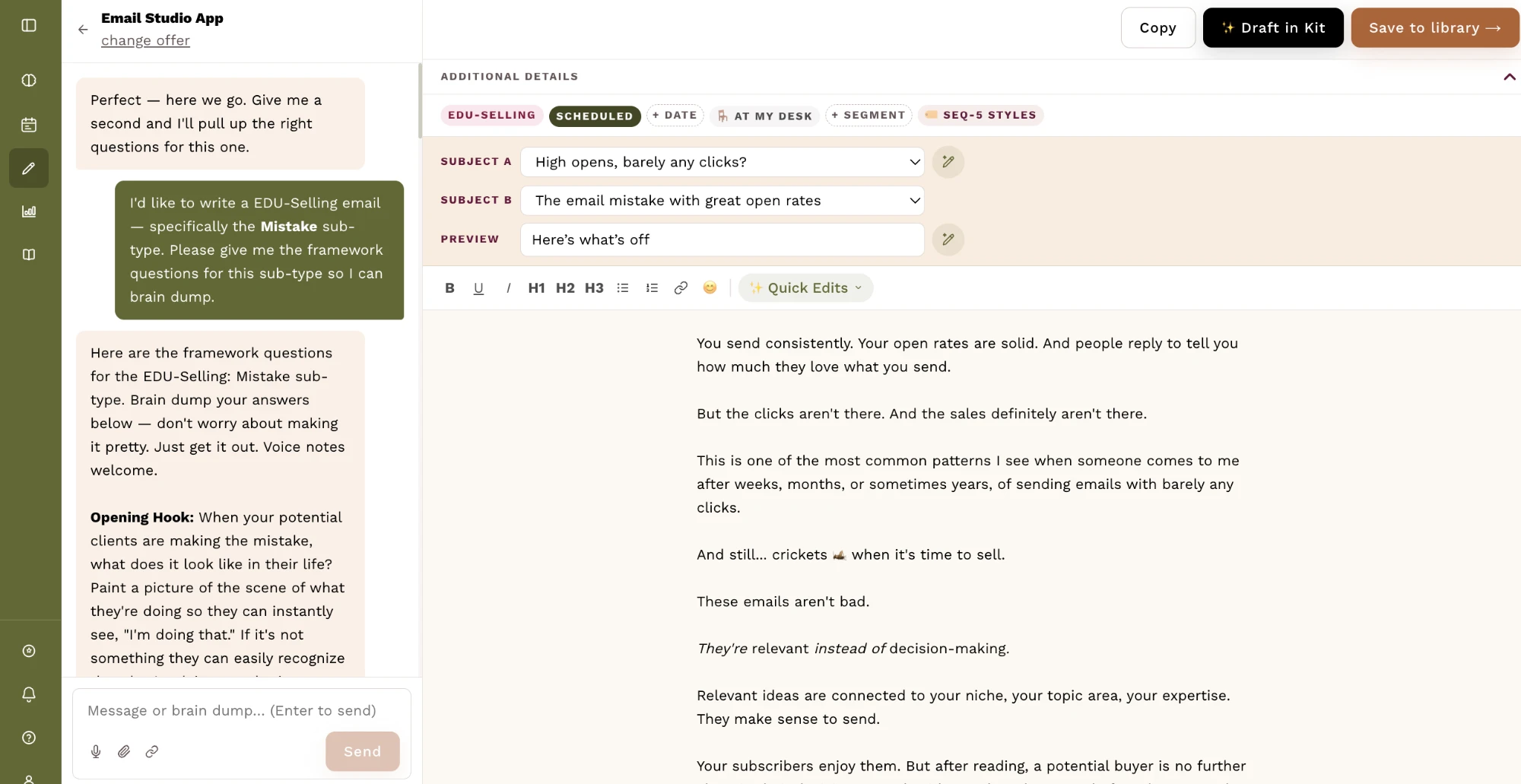
The Email Studio writer. On the left, the app has handed over the framework questions for an EDU-Selling Mistake email, ready to be answered by typing or voice note. On the right, the draft being built — two subject lines to test, a preview line, and the body.

916

Emails written
by members

5m 11s

Average time
to write one

90%

Written in under
ten minutes

30+

Proven email styles
built to convert

What makes it different

🎙️

Talk it out — from anywhere

Go for a walk and just yap. Email Studio turns your voice notes into emails designed to convert — so you never have to sit at a desk to write again.

🤝

It co-writes with you — not for you

This isn't a button that spits out generic AI. It interviews you or repurposes what you've already created, pushes for clarity when you're vague, and shapes your ideas — so every email is yours, just sharper and faster.

🎯

Built on proven email styles

It's trained on 30+ email styles engineered to engage, build demand, and convert — so every email has a job. You can even train it on your own style to make it sound even more like you.

How it works

01 — Your brand voice

It sounds like you. Not like AI.

AI writing reads like AI because it's guessing at your voice. Upload writing you've already done — emails, blog posts, captions, anything — and Email Studio builds your voice profile from it.

  • Your phrases, your emoji habits, your sentence rhythm, your sign-off
  • As you use the writer it learns how you speak and what you revise, and updates your voice
  • Add more samples later and they merge in, never overwrite
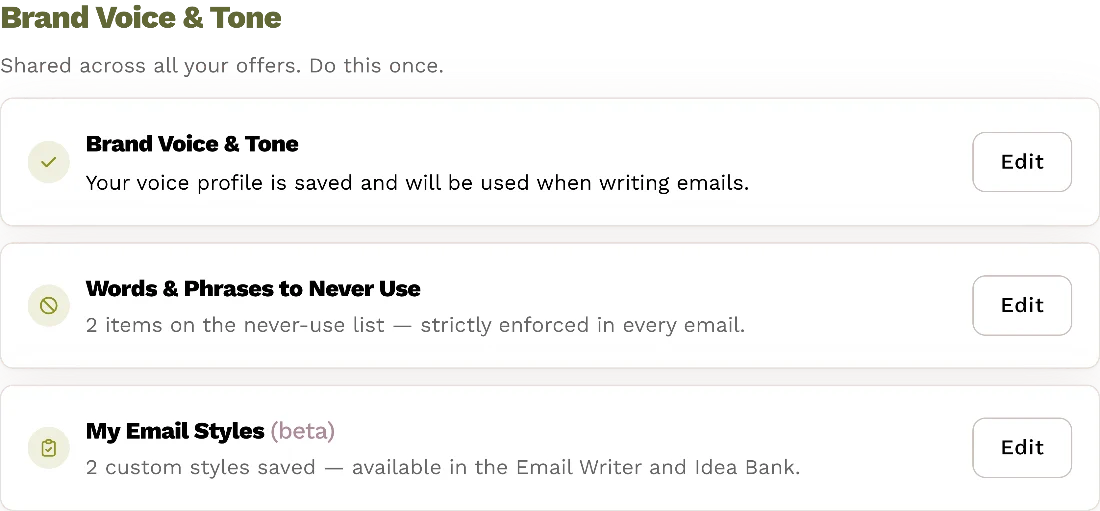
Brand Voice and Tone in the Content Brain, with a saved voice profile, a never-use list and two custom email styles.

02 — Your assets Coming soon

It writes from what you've already made.

Hand over your webinars, coaching calls, podcast episodes and curriculum. Email Studio reads them and pulls out your own frameworks by name — so naming one in a voice note is enough for it to know exactly what you mean.

  • Price, format and who it's for, read straight off your sales page
  • Upload a transcript, paste it in, or drop in a batch of blog, podcast and YouTube links
  • Generate ideas and repurpose any asset into emails
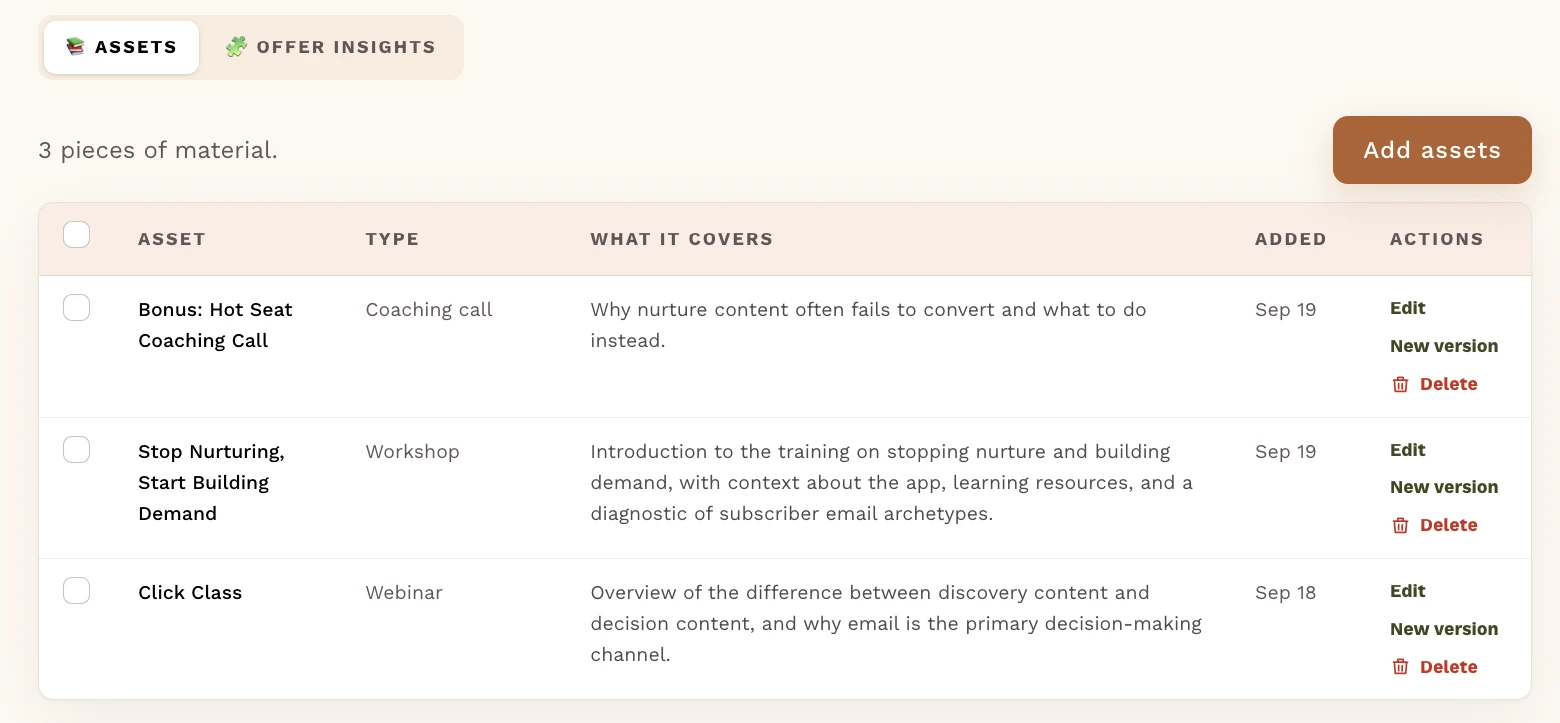
The Assets area for the Email Studio App offer: three pieces of material — a hot seat coaching call, a workshop and a webinar — each with its type, a line on what it covers, and the date it was added.

03 — Client stories

Every client's proof, in one place.

Your best proof is sitting in onboarding forms, testimonials and screenshots you never open again. Drop it in once and it files itself under the right client.

  • Connect Airtable, Typeform or Sheets and new forms file themselves
  • Every client gets a profile with all of their assets compiled together, ready to write case studies
  • Write a whole case-study email about one client in a click
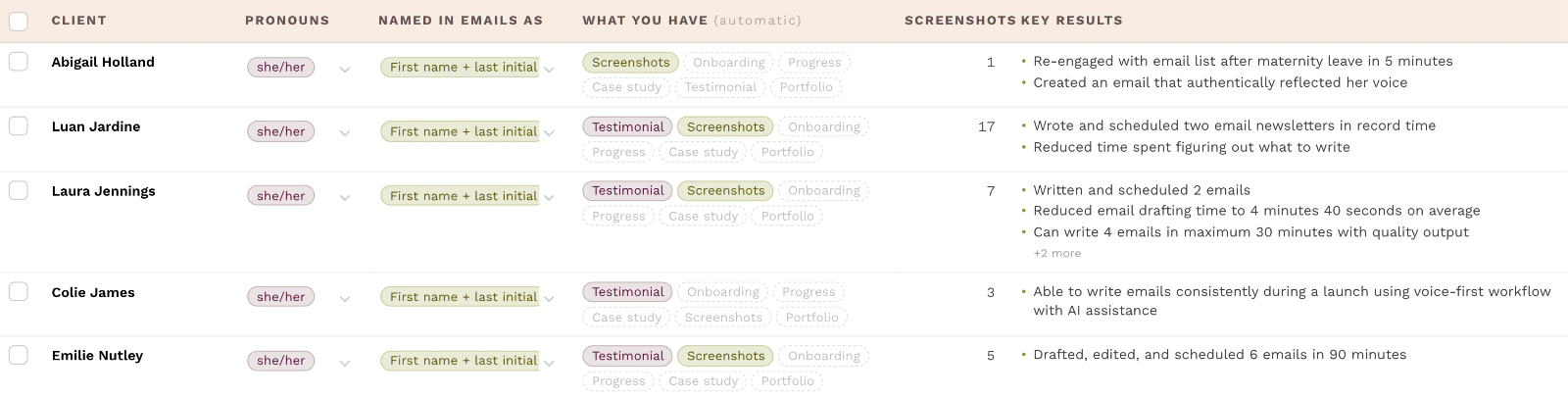
The client roster: each client with their pronouns, how they're named in emails, which material you hold on them — onboarding, progress, testimonial, screenshots — and the key results already pulled out.

04 — Proof in the email

Leverage your client proof in your emails.

A real client result, in the numbers they actually gave you, landing in the draft itself.

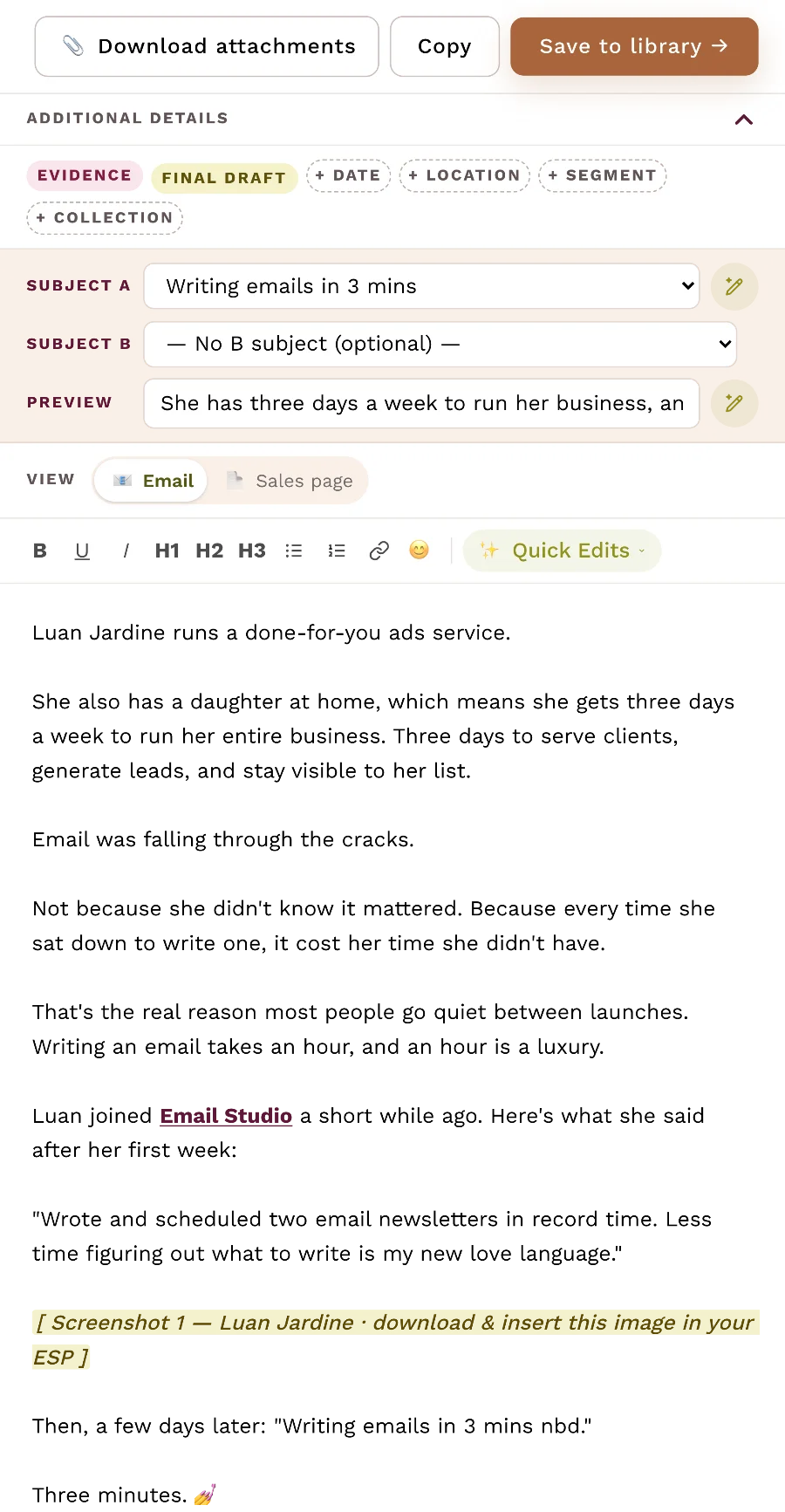
  • Auto-generate a case study email from your clients' onboarding, progress, case study and testimonial forms and screenshots
  • The writer looks for opportunities to weave in screenshots or client stories in any email
  • Insert any screenshot or testimonial in one click and it's ready to download and add to your email
A finished draft built from a client's win: her words quoted in the email, her screenshot marked in place, and a Download attachments button at the top.

05 — The Planner

You never open it wondering what to send.

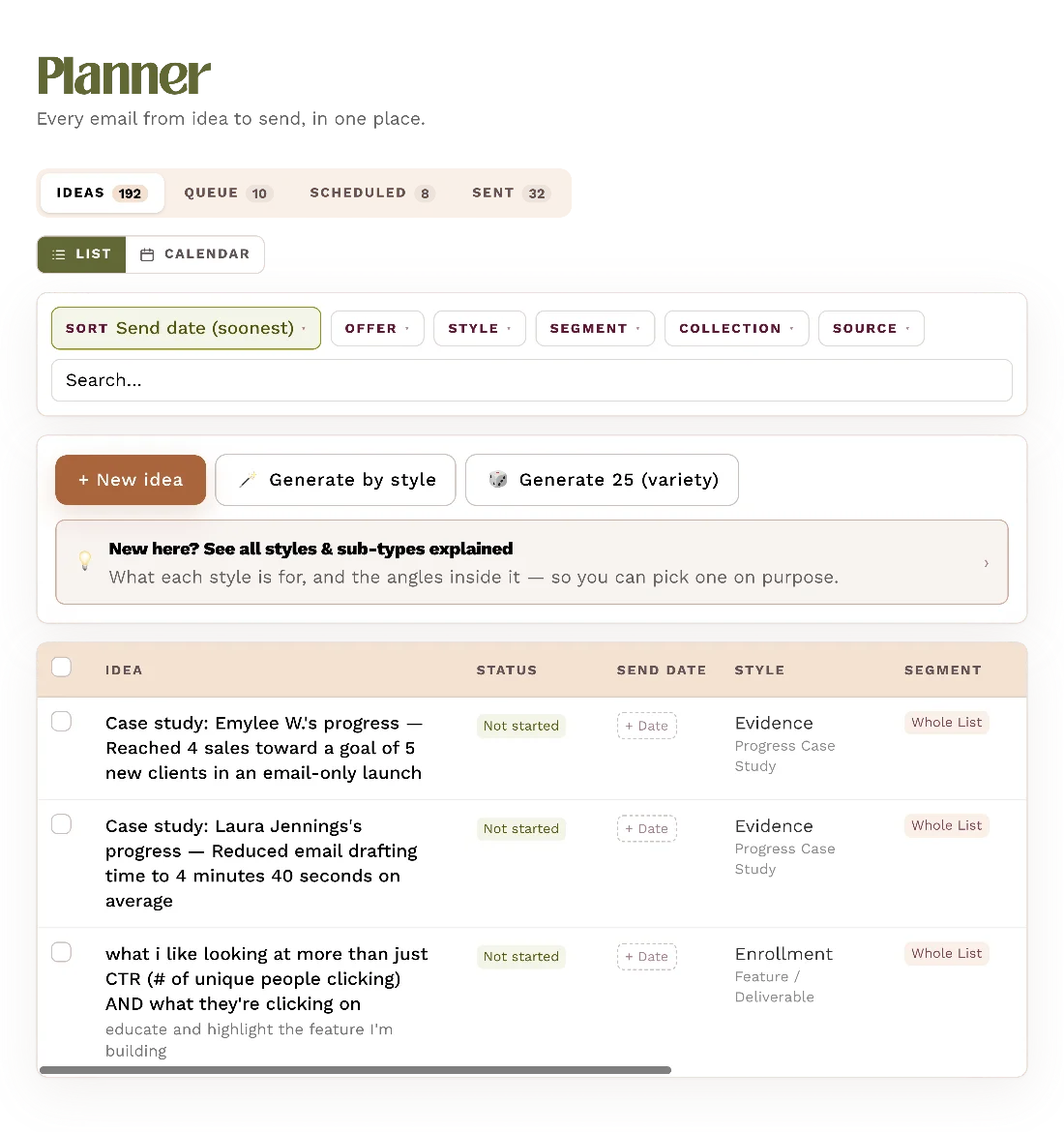
The blank page is the real bottleneck, so it's gone before you get there. Around 25 ideas per offer, generated from your frameworks and your client results — then queued, dated and scheduled.

  • Ideas, queue, scheduled and sent, all on one screen
  • Generate more by style any time you want
  • Drag your sends around on a calendar
The Planner with tabs for Ideas, Queue, Scheduled and Sent, buttons to generate ideas, and generated ideas each tagged with a style and offer.

06 — The Writer

Go for a walk. Come back with an email.

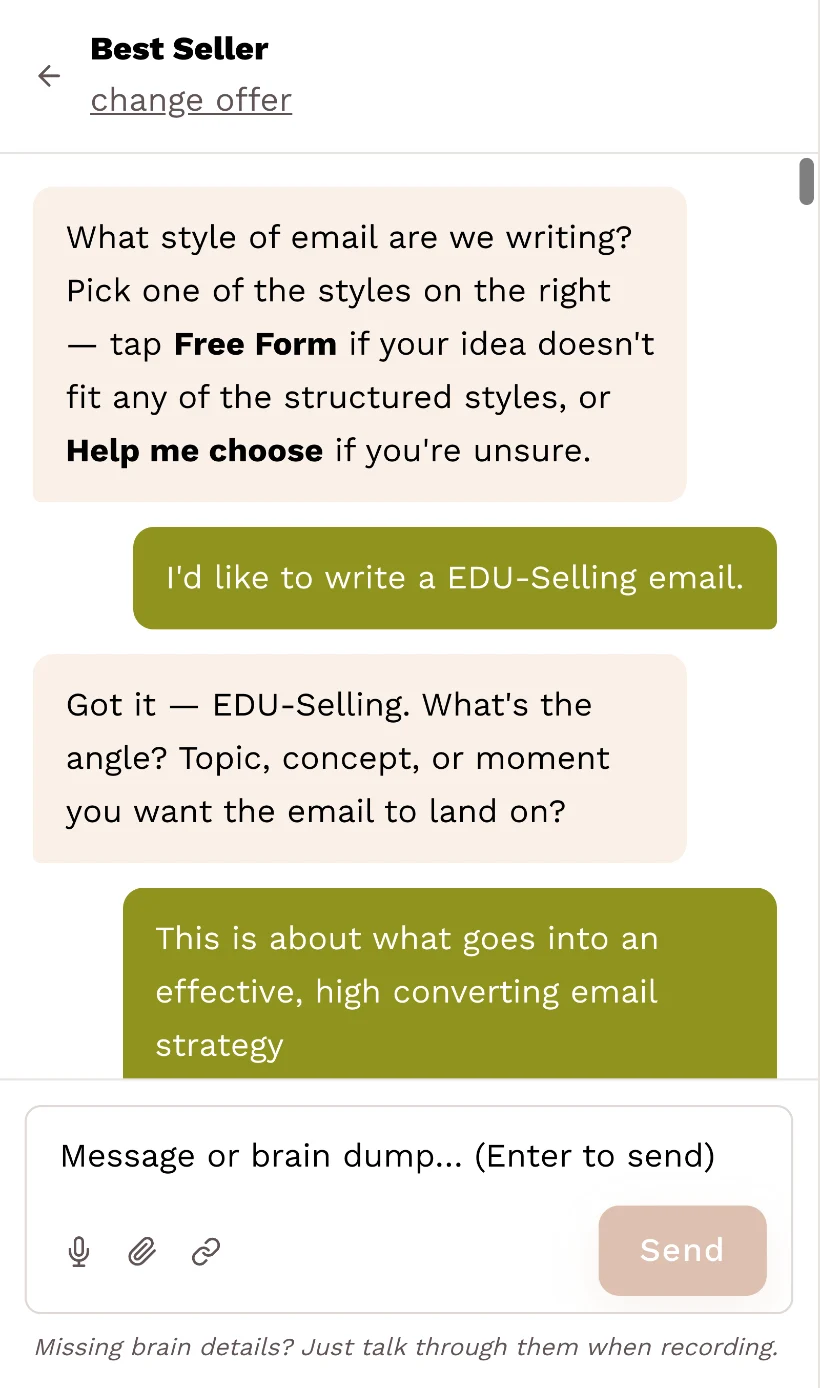
It already holds your voice, your offer and your proof — so it asks only for what's missing, using the specific questions that email type needs. You answer out loud. It writes.

  • A full draft back: subject line options, preview line, body
  • Accept or reject each edit, the way you would in a Google Doc
  • Anything already in your brain, it never asks you twice
The writer's interview: it asks which style of email and what angle it should land on, and the writer answers in the chat with a voice note option in the composer.

07 — Insights Coming soon

Get insights and track what's working.

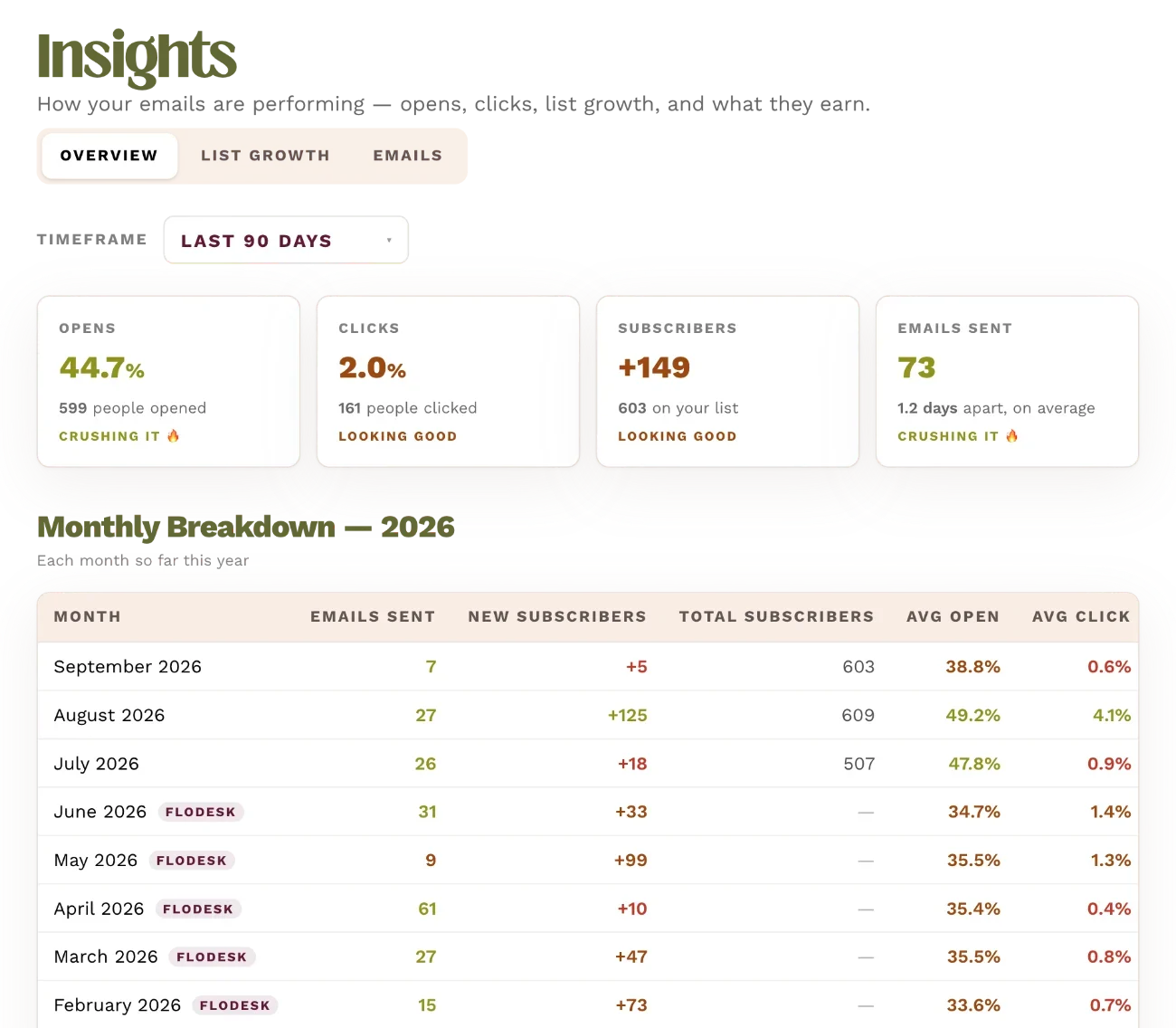
Opens, clicks and replies pulled in from your email platform, so you can see which emails earned their place and write more of those.

*Kit, Flodesk and MailerLite will be available first.

Insights: open rate, click rate, new subscribers and emails sent for the last 90 days, above a month-by-month breakdown of emails sent, subscribers, opens and clicks.

08 — The Learn library

You get better at this too.

Email Studio comes with my Learn library — the exact email topic-planning and copy strategies I've used to help clients pull off multiple five- and six-figure launches. It's the same strategy the app itself is trained on, so you'll understand exactly what's happening behind every email it helps you write.

  • Watch or read, in the order you'll actually need them
  • Map 90 days of email before you write a single word
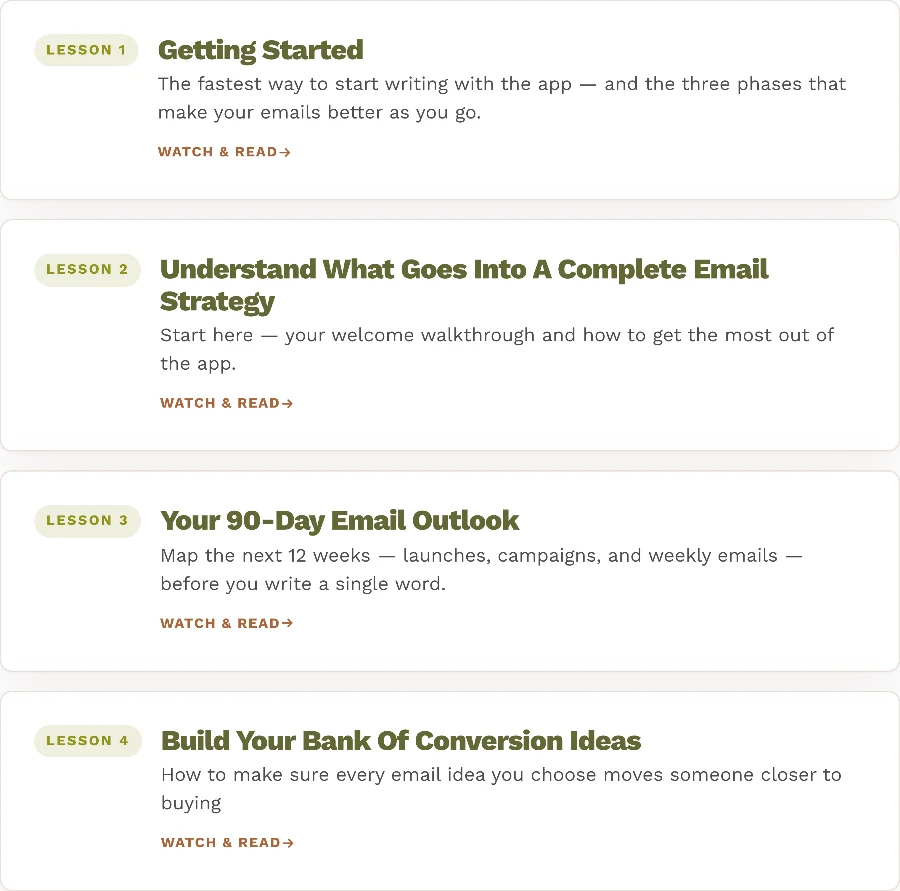
The Learn library with lessons on getting started, what goes into a complete email strategy, your 90-day outlook and building your bank of conversion ideas.

A few more things you get.

🏆

Sender Rewards

Milestones as you send, because the only email strategy that works is the one you keep doing.

📱

Built for your phone

The whole thing works on mobile, which matters so you can write your emails from anywhere but a desk.

🔌

Integrations Coming soon

Integrates with Kit, Flodesk, MailerLite and more to gain insights and publish your emails.

💬

App Support Channel

A space to go for any questions on how to use the app, requesting features, sharing wins, reporting bugs, and any member-only events.

Wins members shared within their first week of joining the app

Nicole

First email written and scheduled!! It came out great and went SO fast!

💜 1

Laura J.

I have written and scheduled 2 emails already! I am LOVING how easy the user interface is, and I can already tell that these emails are NOT going to sound like AI at all — esp once I'm able to input more examples for it to work off of.

😍 1

Abigail H.

omg — I watched the trust-building taste and I'm re-engaging my list after maternity leave. Took me 5 mins and I have an email that literally sounds so much like me I could dieeee. so excited!

🥳 2

Colie

I sent TWO emails today. First to my general list and another to the people signed up for my free training tomorrow. I have three others in the queue and scheduled 🎉

❤️ 2

Hannah

First draft done in 3 mins 🥹 Jocelyn I can see how much thought and effort you put into this app. Even the onboarding is helping me tighten up my understanding of my own messaging — I can see how even my sales pages will improve with this.

😍 1

Emilie N.

Last night I drafted, edited, and scheduled 6 emails for this week — took no longer than 90 minutes. x

✅ 1

Luan J.

Wrote and scheduled two email newsletters in record time 🏃‍♀️🏃‍♀️ SO glad I joined Email Studio. I only have 3 days a week I can work, the rest is dedicated to my daughter. Less time figuring out what to write is my new love language.

❤️ 2

Ina

Just sent out an email today and got a couple of replies from it — so that's good!! yay!

😍 1

Hi, I'm Jocelyn, the human who built this thing 👋

Jocelyn Montemarano, who built Email Studio.

For 5 years I've been the person coaches and experts call when they want their emails to actually sell. Six-figure launches, individual emails pulling 5-figures, a personal list of under 450 subscribers that's generated multiple 6-figures.

Most people approach AI the same way: upload some training files, give it your brand voice, and expect it to create content for you from there. That doesn't work — and I know that because I spent a decade doing done-for-you content creation for other experts.

I never would have asked 20 questions once and thought I could write all of their content for them. The work required ongoing collaboration. Their expertise plus my content brain, on repeat.

That's the exact process I built into this app. Fast, low-lift input from you at the right moments — so what comes out is actually built from your unique perspective, experience, and ideas, not just styled to sound like it.

A co-writer, not an auto-generating slop machine.

Email Studio vs. generic AI

ChatGPT and Claude aren't trained on sales psychology, sales messaging, conversion copy, or high-converting email styles — and they don't know how to prompt you so it feels like an interview instead of sitting down to write an email.

 Email StudioChatGPTClaude
Trained on 30+ email types built to engage, build demand and convert✓——
Builds sales messaging from your actual offers✓——
Interviews you, so you can voice-note an email in about 5 minutes✓——
Writes with your real client results and their exact words✓——
Knows your own frameworks by name✓——
Pulls client material straight from your forms, automatically✓——
Creates custom styles from emails you've already written✓——
Learns and remembers your voice and tone✓re-promptre-prompt
Learns from the edits you make and applies them next time✓——
Accept or reject each edit, like tracked changes✓——
Auto-generates ideas and tells you what to send next✓——
No prompt engineering — it prompts you✓——
Built only for emails that convert✓generalgeneral

For experts, coaches & creators

However you help people — and whatever you sell — Email Studio writes for it.

1:1 coaching Courses Memberships Digital products Group coaching Masterminds Done-for-you services Intensives VIP days & weeks Apps & software Free events

Every one of those offer types is already built in. High-ticket or low-ticket, B2B or B2C.

What members are saying

Real notes from people using it right now.

Jodi

I just did my first walk and yap with the email app to answer the interview questions… and my favorite part (on top of it making me sound really great) is the clarity questions it asked when I didn't go specific or deep enough. I felt like you were on the walk with me pushing me!! 🕺🕺

🕺 2

Emilie

The best thing about the email app is that I'm adding email topic ideas to my queue that are BRILLIANT and I would have NEVER thought of by myself.

Problem is, now my queue is too full of ideas. Will have to email every day for the rest of my life and make a tonne of money. oh well 😝

🤩 2  😝 1

Marit

This app is absolutely amazing. It used to take 1 hour to just write an email and with this app everything, and I mean everything is done within 10 min. So the voice note what I want the email to be about, revising, and scheduling.

❤️ 1

Katie

My wins and milestones:
✅ Completed my brain
✅ Wrote my first email
✅ Wrote from the shady front porch

👑 1

Jodi

haha that's amazing!!! This app gets better + cooler by the hour!!

💅 1

Luan J.

This app is insane. I'm having so much fun 💃💃

🕺 1

Andrea

On top of the app writing great emails, I also REALLY appreciate the trainings. I went through them all today, created my 90 day email plan, and mapped out next month's emails. I'm excited to go in and start writing them with STRATEGY!

😍 1

Laura J.

Y'all — I grabbed Email Studio this morning bc I could tell it was genius just from watching the video she sent out to the waitlist — aaaaand I was correct. It's SUCH an intuitive resource for email writing and I'm obsessed with the fact that I can just voice note jabber my thoughts out and they turn into this solidly written email in my voice. 👏🏻 Also, it's a literal steal at its price point. HIGHLY recommend!

❤️ 6

Laura J.

I have like 4 emails I want to write tonight and I'm so amped knowing that will only take me max 30 min to do — AND they'll be solid, not rushed crap lol

❤️ 3

Your Inbox Could Feel Totally Different in 30 Days

Without Email Studio

  • ✕Still staring at a blank page, promising yourself you'll "batch later."
  • ✕Sending maybe one email a month — if that.
  • ✕Sounding like everyone else, or like generic AI.
  • ✕Client wins sitting in a folder you never open, never making it into a single email.
  • ✕Your best offers stay a secret because writing about them feels gross.
  • ✕Your list goes cold — and so do your sales.

30 days from now with Email Studio

  • ✓A month of emails written in about an hour — voice-noted on a single walk.
  • ✓A full idea bank, sorted by your offers, ready to go.
  • ✓Every email sounds unmistakably like you.
  • ✓Real client results woven through your emails — accurately, and in your words.
  • ✓Selling feels natural because it's woven right in.
  • ✓Your list hears from you consistently — and buys.

What you get with Email Studio:

The 100 Members in 100 Days spots are gone — Email Studio is back to its regular $299 every 6 months.

100 Members in 100 Days · 30 spots left · or until Oct 1 — whichever comes first

Bonus 1

$100 off your first 6 months

Your first 6 months of Email Studio for $199 instead of $299. After that it renews at the regular $299 every 6 months.

Only 30 spots left at this price, and the offer ends 11:59 PM PT on October 1 — whichever comes first.

Bonus 2 · The 100-member bonus

The Severely Underutilized Email Strategies Playbook

This playbook will break down the most overlooked strategies to increase your revenue from email — the ones most people haven't even thought of — that you can use to make more money from your list before the end of the year!

These won't be the basic stuff like "send more emails" and not the larger, more time-consuming things like "run a big campaign." Just sneaky little things you're totally overlooking.

Unlocked for you when Email Studio crosses 100 members.

  • ✓A writer trained on your whole brain — your voice, your offers, your frameworks, your positioning and your never-say list.
  • ✓Your real client proof, built in — results, quotes and screenshots read once and used accurately forever.
  • ✓An idea bank that's never empty — about 25 ideas generated per offer, plus more on demand.
  • ✓30+ email types — each with its own framework and its own interview questions.
  • ✓Voice notes in, finished emails out — transcribed, questioned, drafted and formatted.
  • ✓A real editing layer — tracked changes, slop sweep, subject line A/B, preview lines, snippets.
  • ✓Form auto-sync — connect Airtable, Typeform or Google Sheets and client material files itself.
  • ✓The 9-lesson Learn library — my complete email playbook, the same strategy the app runs on.
  • ✓500 credits every month — roughly 10–15 emails, refreshed monthly.
  • 100-MEMBER BONUS: The Severely Underutilized Email Strategies Playbook — delivered when we cross 100 members.

100 Members in 100 Days · $100 off

Normally $299

$199

For your first 6 months — 30 spots left · or until Oct 1 — whichever comes first. Then $299 every 6 months.

Get Email Studio →

Cancel auto-renewal any time, right inside the app.

Questions, answered

What type of offers does this work for?

Expert offers of every kind — group coaching programs, done-for-you services, done-with-you intensives, memberships, courses, digital products, apps, and more. Each of those offer types is already built in. It works for high-ticket or low-ticket, B2B or B2C.

My list is small — is this even worth it until I've grown my audience?

As long as you have a list to send to, you can start using Email Studio immediately. I made my very first email sale with 72 people on my list — and I started emailing consistently with just 23. I've made multiple six figures from a list under 450. List size isn't the issue; sending the right emails is. Plus, knowing your emails are actually built to create demand and sell makes growing your list way more motivating.

I haven't nailed my messaging or positioning yet — don't I need that figured out first?

The app helps you with this. Built in: audience research to understand your market and what's working, analysis of any buyer data you already have to surface messaging you've been missing, and an offer interview where you yap out your thoughts and it generates a message map for you. Plus the Learn library guides you on the ideas and messaging that hit on what potential buyers need to hear, see, feel and understand to be excited to buy.

I've never made a sale from email before. Will this work for me?

Yes. As long as you have some subscribers to send to, Email Studio will help you build the skill of writing high-converting emails. It's designed to take you from completely new sender to pro through its guided process, the extra Learn library training, and learning through implementation rather than theory — shortening the learning curve and making these emails faster to write once you know how.

I'm already a strong emailer — will this still work for me?

If you'd rather turn voice notes into high-converting emails than spend hours at your desk, then yes. Several people making multiple six figures from their list alone have already joined, because they know the ROI email gives them and want to get more out of their list by writing faster. Because you're co-writing with the app, you steer the direction — so your unique perspective, ideas and framing are baked in. And you can train it on your own structures with Custom Styles, which analyses your favourite emails and turns them into styles you can write from again.

Will this help me write launch emails, funnel emails and automated sequences?

Yes. It's trained on 29 email types across 7 styles and can generate ideas for each — warm-ups, sales emails, objection emails, funnel emails, automated sequences and more, all designed to build demand and create sales. Identify your topics (the app can help with this), add them to your queue, and work with the writer to give it what it needs for each one. Every email in this campaign was written with the app.

Does it just write the emails for me — isn't AI going to be generic slop?

Not this app. It doesn't auto-generate content for you — you give it your input: your unique perspective, ideas, experience and expertise, and it shapes that into a high-converting email. It interviews you, pushes for clarity when you're vague, and shapes your ideas — the email stays yours, it just gets there faster. It's exactly how I worked with clients when I created their content as a human. You still infuse your uniqueness into everything (and the app guides you on how to pull it out for each email) — the app is the conversion copywriter that translates your genius into an email that builds demand and sells your offer.

How is this different from voice-noting with Claude or ChatGPT that I've already trained on my voice?

Voice-training your AI handles one problem: making sure it sounds like you wrote it. Email Studio was built to solve a completely different problem — making sure what you wrote actually converts.

It's trained on 29 types of high-converting emails. It's not just taking a voice note and dropping it into a beginning, middle and end. Before it writes a single word, it walks you through the exact questions you need to answer to make that specific email type work — what your potential client needs to think, feel and understand at each beat of the email to move closer to buying.

Claude and ChatGPT don't do that. They take what you've given them and put it into a structure that makes sense. Email Studio is trained on sales psychology, conversion copywriting, and how to extract the sales angles from your offer that make it work. It also holds your real client results and weaves them in — accurately, with the numbers exactly as your client stated them.

⭐ Plus, inside Email Studio you get my Learn library. It teaches you the method behind every email type, so you also get better at what you're giving the AI — and how you revise the outputs for ROI.

Will it actually sound like me?

Yes. It trains on your voice, tone and offers in the Content Brain, then writes every email from that — so it sounds unmistakably like you. And it keeps getting closer: when you edit a draft before saving it, the app works out whether that edit was a one-off or a rule, and if it's a rule, every future email already follows it.

Do I really not have to write at my desk?

Right. Record a voice note on a walk, in the car, wherever — Email Studio turns it into a finished, conversion-focused email. Across everything members have written so far, 46% of emails were written somewhere other than a desk.

I'm not techy. Will I be able to use it?

If you can send a voice note, you can use Email Studio. The whole app is built to feel like a conversation, not software.

I'm a one-person show. Does it take a lot of time to learn the platform?

Girl, same — as are the majority of my clients and users. That's exactly why you need a tool that helps you implement the actions that make sales, both faster and more effectively (and dare I say, more fun). Peep the stats: members have written 846 emails in the app so far, with a median writing time of 3 minutes 45 seconds — and 9 out of 10 emails are done in under ten minutes. The guided in-app onboarding gets you set up in about 15 minutes and writing the same day.

I've bought tools and courses I never logged into again. What makes this different?

We go straight into implementation — learning by doing, not by theory. I built this so you have your first email written within a day of joining, and we're tracking right around there. Guided in-app onboarding, quick tips to learn each feature, an email onboarding flow, and same-day Slack support all make sure you don't get stuck and you get to sending ASAP.

How does the 100 Members in 100 Days offer work?

There are 30 spots at $100 off, and the offer also ends at 11:59 PM Pacific on October 1 — whichever comes first. Your discount is applied at checkout, so you pay $199 for your first 6 months instead of $299. After that, it renews at the regular $299 every 6 months.

You also get the 100-member bonus playbook, The Severely Underutilized Email Strategies Playbook, delivered as soon as Email Studio crosses 100 members.

What exactly do I get?

6 months of full access to Email Studio — your first term at $199 while the 30 spots last — including 500 credits every month — enough to write about 10–15 emails a month on average — plus the complete 9-lesson Learn library.

How far do 500 credits go?

About 10–15 emails a month on average. Credits are spent as you draft, generate ideas and rewrite — and they refresh every month.

What if I run out of credits?

No problem — you'll have the option to buy more à la carte: 1,000 credits for $25. Purchased credits don't expire for as long as you're an Email Studio user.

What happens after 6 months?

After your first 6 months at $199, you renew at the regular $299 every 6 months, for as long as you want to keep using it.

Can I cancel anytime?

You can cancel auto-renewal whenever you want so you won't be billed again — though the current term (your first 6 months for $199) is non-refundable. You can cancel right inside the app; no need to email or jump through hoops.

Join the first 100 members

Your first 6 months of Email Studio for $199 — $100 off, plus the 100-member bonus playbook. Only 30 spots left at this price, and the offer ends 11:59 PM PT on October 1 — whichever comes first.

Get Email Studio →

Then renews at $299 every 6 months · 500 credits a month · Cancel renewal anytime

Scale Your Resonance

© 2026 Scale Your Resonance · Privacy Policy · Terms of Service · Sub-processors